
Introduction – Optimiser After Effects : un guide pour revitaliser les performances en vidant le cache
Rencontrez-vous des lenteurs ou des dysfonctionnements lorsque vous travaillez sur des projets complexes dans After Effects ? Vous n'etes pas seul. L'un des coupables courants de ces problemes est un cache surcharge. A mesure que vous travaillez sur vos projets, After Effects stocke des fichiers temporaires dans son cache pour accelerer le traitement. Cependant, avec le temps, ce cache peut se surcharger, entrainant une baisse des performances.
Mais pas d'inquietude ! Vider le cache dans After Effects est une solution simple mais efficace pour ameliorer les performances et resoudre tout probleme lie au cache. Dans cet article, nous vous guiderons a travers le processus etape par etape, afin de vous garantir une experience fluide et optimisee dans After Effects.
Si vous etes pret a reprendre le controle de votre flux de travail et a liberer tout le potentiel d'After Effects, plongeons-nous dans le processus de vidage du cache. Que vous soyez un professionnel chevronne ou un debutant, nous avons tout prevu avec nos instructions faciles a suivre. C'est parti !
Vider le cache dans After Effects : instructions etape par etape
Vider le cache dans After Effects est un processus simple qui peut vous aider a optimiser votre flux de travail et a maintenir des performances superieures. Suivez ces instructions etape par etape pour vider le cache et resoudre les problemes persistants :
1. Fermez After Effects : avant de vider le cache, il est important de fermer completement After Effects. Cela garantit qu'aucun fichier n'est verrouille ou en cours d'utilisation pendant le processus.
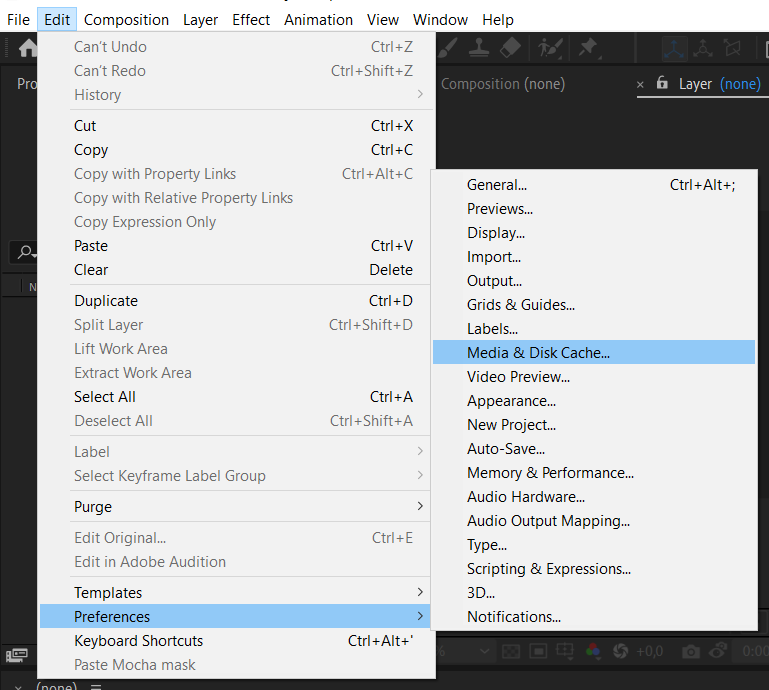
2. Localisez le dossier de cache : le dossier de cache est facile a trouver en accedant au menu Edit, en selectionnant Preferences, puis en choisissant Media & Disk Cache. Vous y trouverez l'emplacement du dossier de cache sur votre ordinateur.
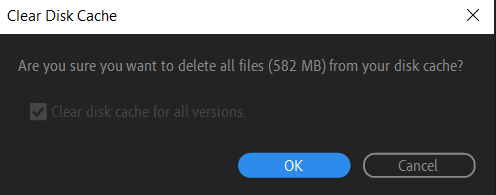
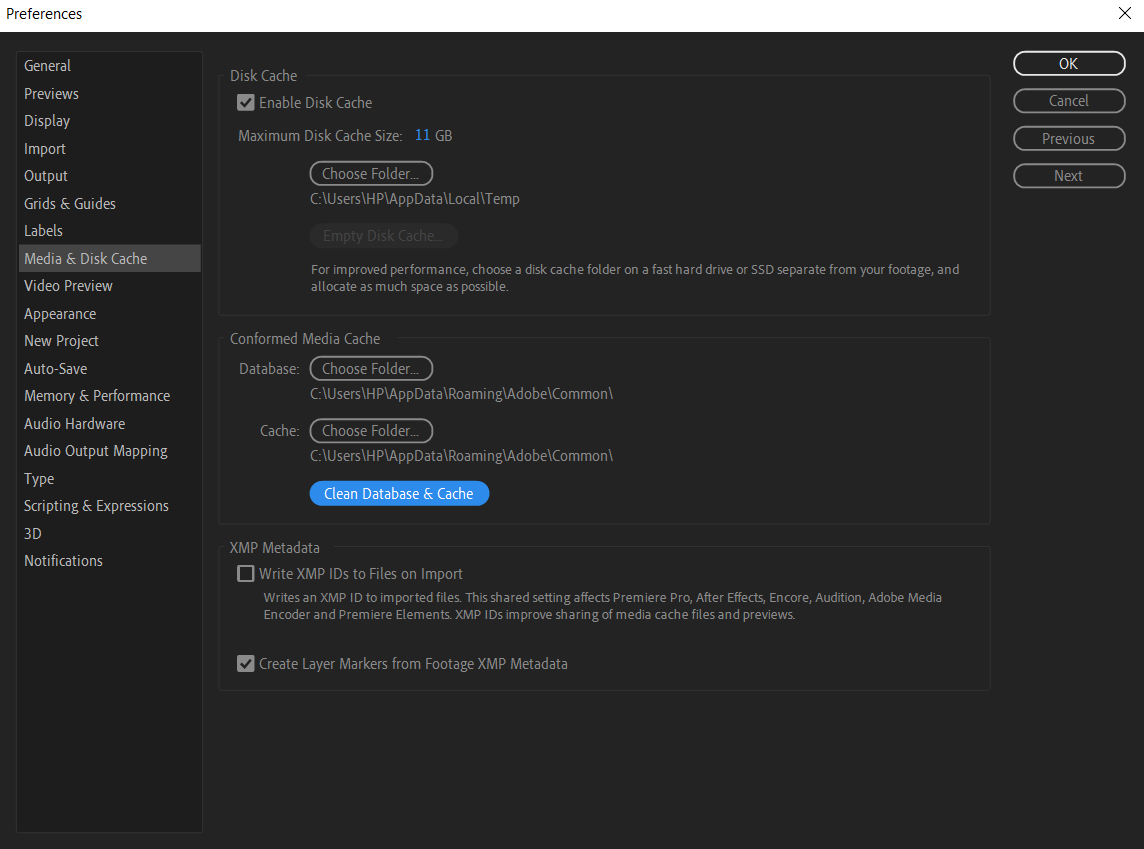
3. Videz le cache disque : une fois le dossier de cache ouvert, il est temps d'effacer les fichiers temporaires. Vous pouvez le faire en selectionnant le contenu du dossier et en appuyant sur la touche Delete (Windows) ou Command+Delete (Mac). Vous pouvez egalement faire un clic droit sur le dossier et selectionner l'option “Delete”.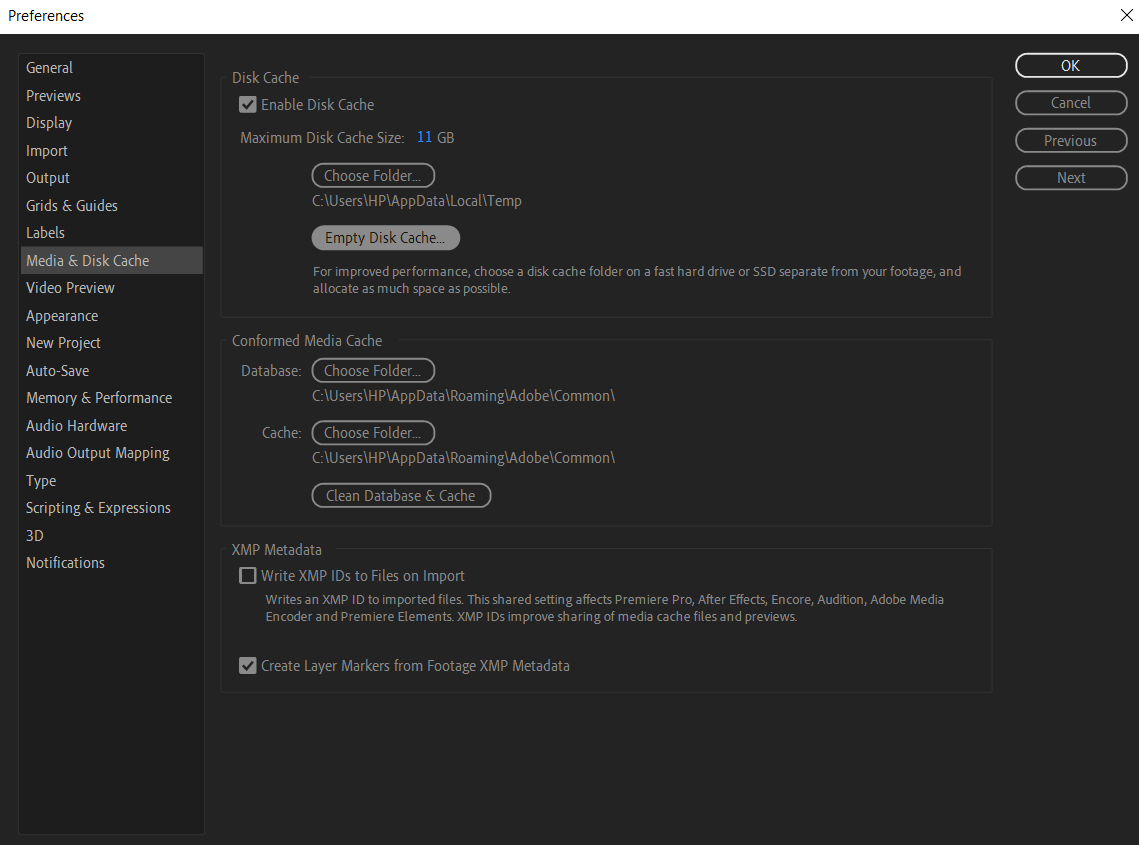
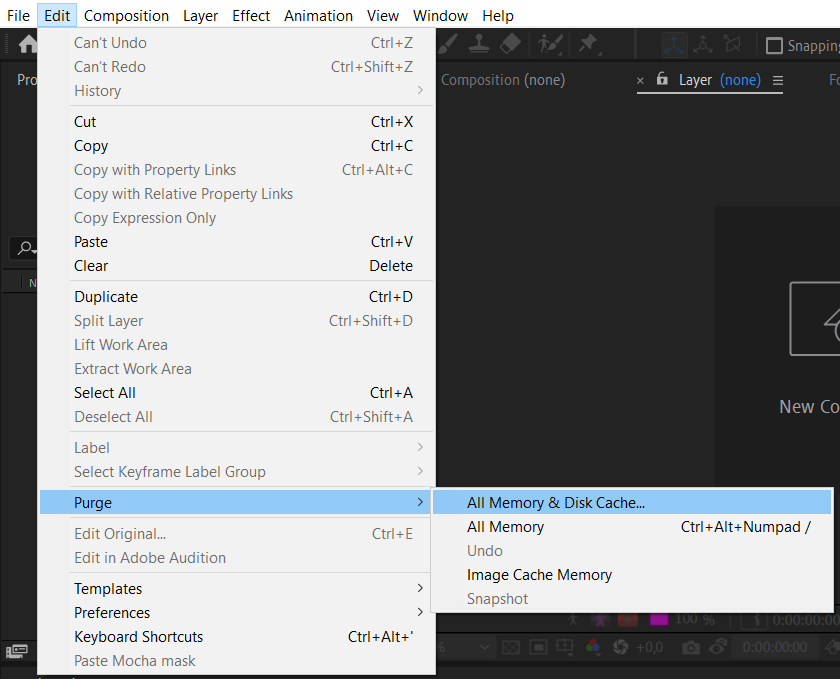
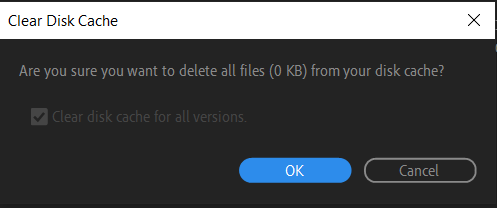
4. Videz le cache RAM : apres avoir vide le cache disque, il est essentiel de nettoyer egalement le cache RAM. Accedez simplement au menu Edit, choisissez Purge, puis selectionnez All Memory & Disk Cache. Cela liberera toute la memoire utilisee par le cache.
5. Redemarrez After Effects : une fois le cache vide, il est temps de redemarrer After Effects. Cela garantit que le logiciel prend en compte les modifications effectuees et repart sur des bases saines avec un cache propre.
En suivant ces etapes simples, vous pouvez vider efficacement le cache dans After Effects et ameliorer les performances globales. Non seulement cela vous aidera a resoudre les problemes que vous rencontrez, mais cela ameliorera egalement votre flux de travail en vous permettant de travailler avec un programme plus fluide et plus efficace.
N'oubliez pas que le cache doit etre vide regulierement pour eviter qu'il ne se surcharge de fichiers inutiles. Integrez cette routine d'entretien a votre flux de travail After Effects, et vous constaterez une amelioration significative de la vitesse et de la stabilite.
Conclusion
Vider le cache dans After Effects est une etape necessaire pour garantir des performances fluides et efficaces. En suivant les instructions etape par etape fournies dans cet article, vous savez desormais comment vider a la fois le cache disque et le cache RAM, optimisant ainsi efficacement votre flux de travail dans After Effects.
Vider regulierement le cache aide a prevenir les problemes de performance et minimise le risque de rencontrer des dysfonctionnements ou des plantages. Cela permet a After Effects de fonctionner a son plein potentiel, vous permettant de travailler sur vos projets sans interruption.
Pensez a integrer le vidage du cache comme une routine d'entretien reguliere dans votre flux de travail After Effects. Planifiez un vidage periodique du cache, en particulier avant de commencer des projets complexes ou lorsque vous constatez une baisse des performances.
En vidant le cache, vous liberez des ressources precieuses, ameliorez la stabilite et garantissez une experience de montage fluide dans After Effects. Alors, veillez a suivre les etapes decrites dans cet article et profitez d'un flux de travail sans accroc dans vos projets creatifs.
Prenez le controle de votre cache, optimisez vos performances et liberez tout le potentiel d'After Effects. A present, allez-y et videz ce cache, puis reprenez la creation de visuels epoustouflants en toute simplicite. Bon montage !
Our Bestsellers
Our Bestsellers


