無料プラグイン
製品
全製品アクセス
リソース
ログイン
ホームブログすべてを支配する1つのエフェクト

すべてを支配する1つのエフェクト

TipsJacob Syrytsia
506487
After Effects
30 Apr, 2025
AEJuiceプロモコードでお得に
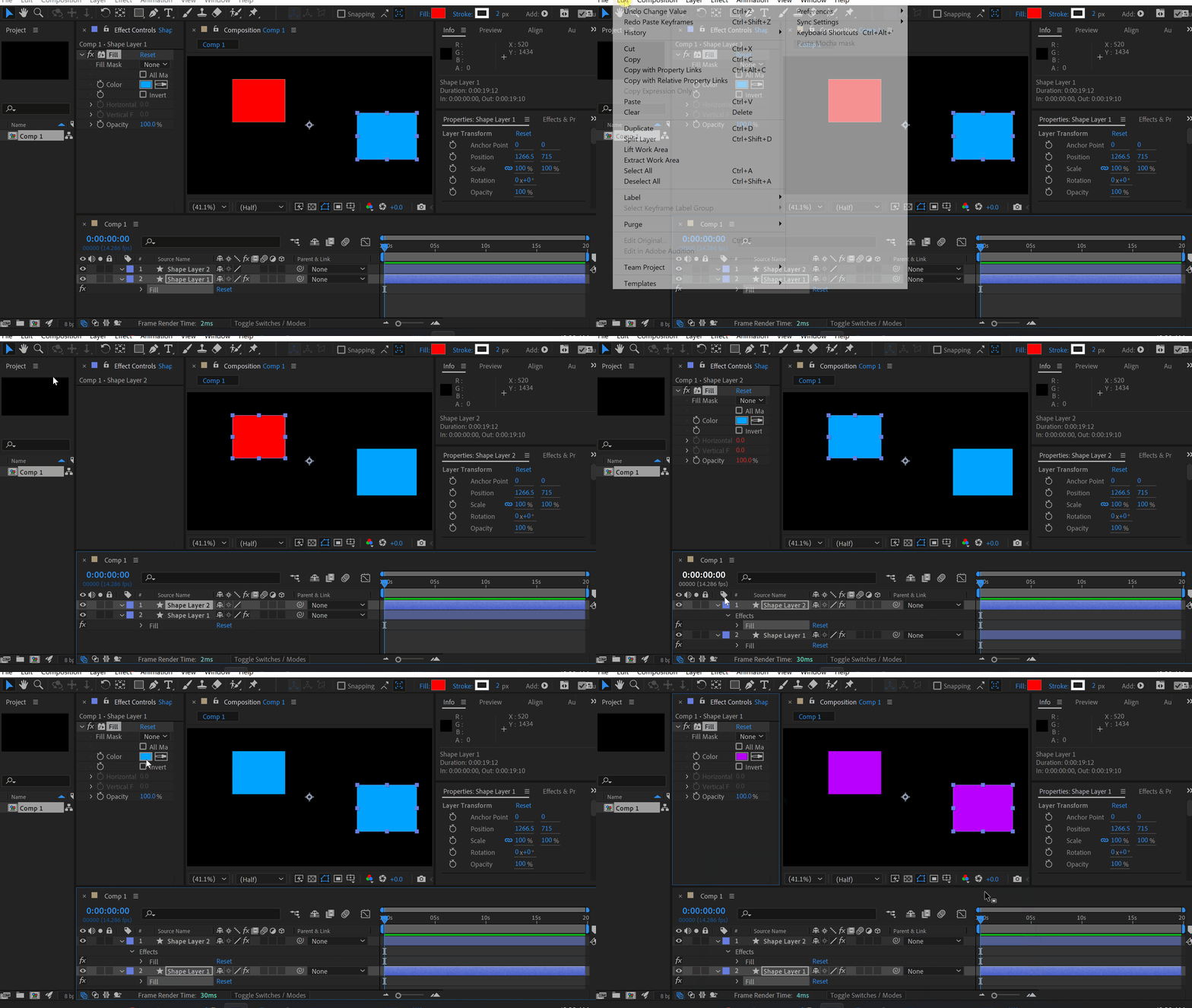
Select an effect, press Edit – Copy with Property Link.
Paste an effect to another layer.
Now you can change the original effect and it will change all copies.
Click here to receive more tips by email.

-50%
-50%
00時間 : 00分 : 00秒
Happy Holidaysサイト全体セール
今すぐ購入

Our Bestsellers

Our Bestsellers

Jacob Syrytsia
Similar Articles
thumbnail-fallback.16c3af4eHow to Animate a Cape in the Wind in After Effects
Tutorials
thumbnail-fallback.16c3af4eHow to Animate a Cape in the Wind in After Effects
Tutorials
thumbnail-fallback.16c3af4eHow to Align Objects on a Diagonal Axis in After Effects
Tutorials
thumbnail-fallback.16c3af4eHow to Align Objects on a Diagonal Axis in After Effects
Tutorials
thumbnail-fallback.16c3af4eHow to Animate a Jumping Logo in After Effects
Tutorials
thumbnail-fallback.16c3af4eHow to Animate a Jumping Logo in After Effects
Tutorials
3526675
メールで問い合わせ24時間以内に返信ヘルプセンター詳細なドキュメント
クイックリンク
ホームアフィリエイトプライバシーポリシー利用規約返金お問い合わせ
サポート
製品無料プラグイン最新情報ブログ会社概要販売を始める
10%オフ — メルマガ登録で割引を受け取ろう!
Copyright © 2021 - 2026 AEJuice LLC. All rights reserved.
support@aejuice.com