無料プラグイン
製品
全製品アクセス
リソース
ホームブログTrim composition in After Effects

Trim composition in After Effects

TipsJacob Syrytsia
506487
After Effects
13 Nov, 2023
AEJuiceプロモコードでお得に
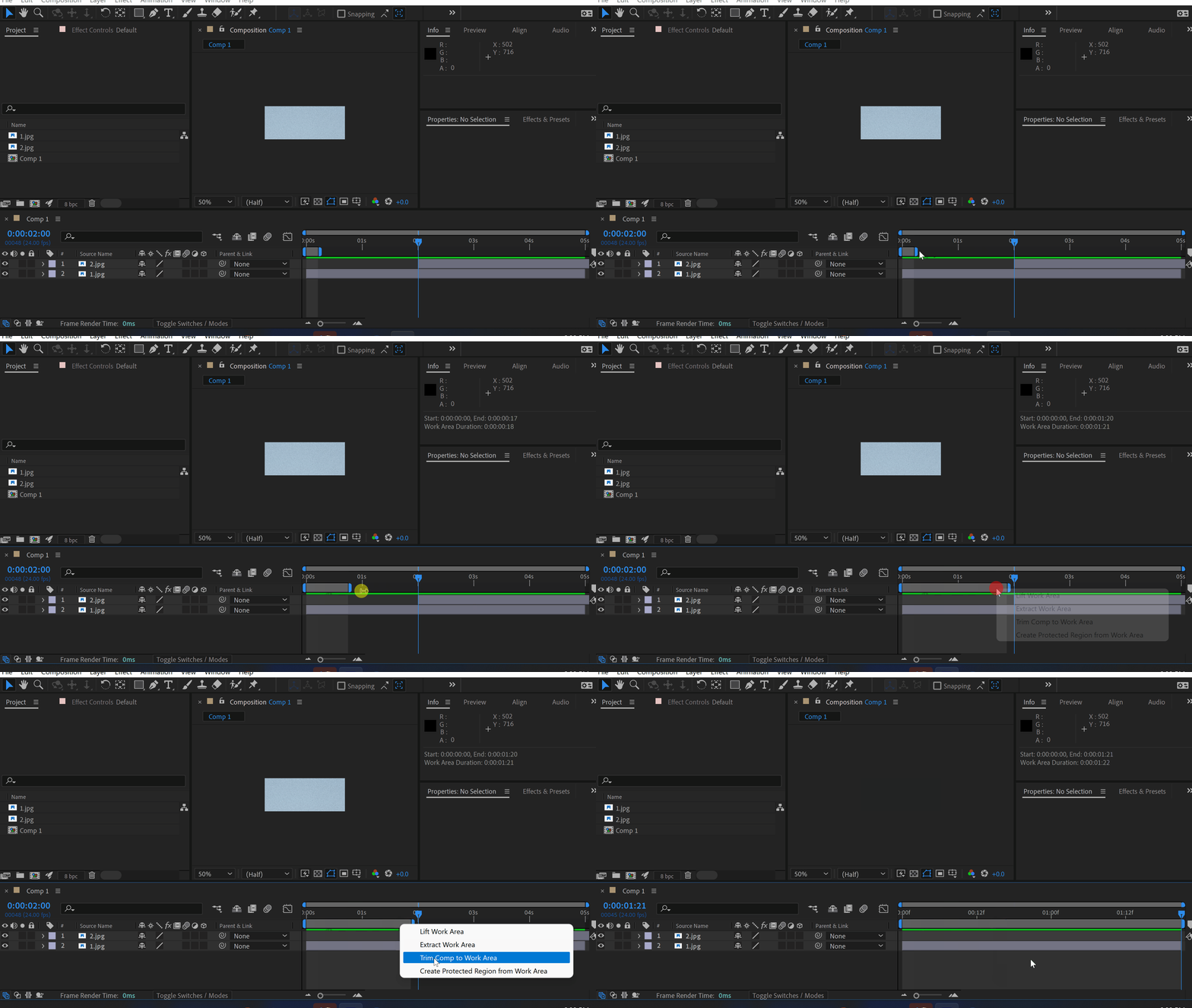
Use your work area duration to trim a composition.
It is much faster than adjusting the comp’s duration in settings.
Pro tip: use shortcuts B and N to adjust the work area.

Click here to receive more tips by email.

-%
-%
00時間 : 00分 : 00秒
サイト全体セール
今すぐ購入
Jacob Syrytsia
Similar Articles
thumbnail-fallback.16c3af4eHow to Create a VHS Effect in After Effects
Tutorials
thumbnail-fallback.16c3af4eHow to Create a VHS Effect in After Effects
Tutorials
thumbnail-fallback.16c3af4eHow to Make an Object Fade in After Effects
Tutorials506487After Effects
thumbnail-fallback.16c3af4eHow to Make an Object Fade in After Effects
Tutorials506487After Effects
thumbnail-fallback.16c3af4eHow to Make Animation in Adobe After Effects
Tutorials506487After Effects
thumbnail-fallback.16c3af4eHow to Make Animation in Adobe After Effects
Tutorials506487After Effects
3526675
メールで問い合わせ24時間以内に返信ヘルプセンター詳細なドキュメント
クイックリンク
ホームアフィリエイトプライバシーポリシー利用規約返金お問い合わせ
サポート
製品無料プラグイン最新情報ブログ会社概要販売を始める
10%オフ — メルマガ登録で割引を受け取ろう!
Copyright © 2021 - 2026 AEJuice LLC. All rights reserved.
support@aejuice.com