
How to Enable Display Acceleration and Optimize Performance in After Effects
Introduction
Have you ever experienced a slowdown in performance while working with Adobe After Effects? It can be frustrating, especially under tight deadlines. Fortunately, there’s a solution that can help: enabling display acceleration. This feature utilizes your computer’s GPU to enhance rendering, playback, and real-time previews, making your editing process smoother and more efficient. In this guide, we’ll walk you through the steps to turn on display acceleration and optimize your After Effects setup.
Step 1: Check Your System Requirements
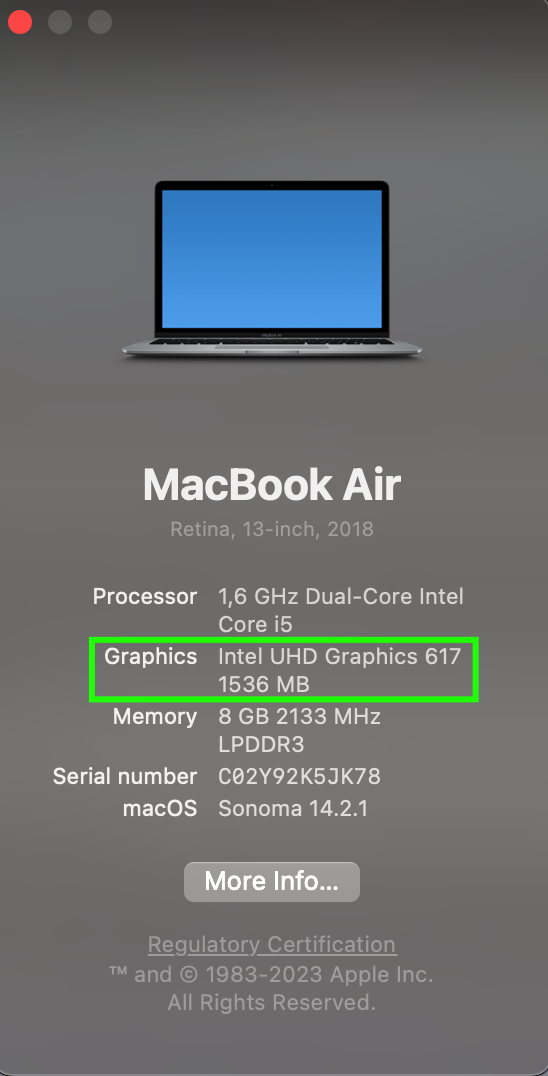
Before enabling display acceleration, ensure your system meets the necessary requirements. First, check your GPU model and available VRAM:
Windows: Open Device Manager by pressing Win + X and selecting Device Manager. Expand the Display adapters section to view your GPU model and VRAM.
macOS: Click on the Apple menu, select About This Mac, then go to the System Report and look under Graphics/Displays.
Update your graphics drivers for optimal performance:
NVIDIA: Visit NVIDIA’s official site to download the latest drivers.
AMD: Go to AMD’s official site for driver updates.
Intel: Check Intel’s official site for the latest drivers.
Ensure you have at least 2GB of VRAM for effective acceleration.

Step 2: Open After Effects Preferences
Launch After Effects and access the preferences panel:
Windows: Go to the Edit menu, select Preferences, and then choose Display.
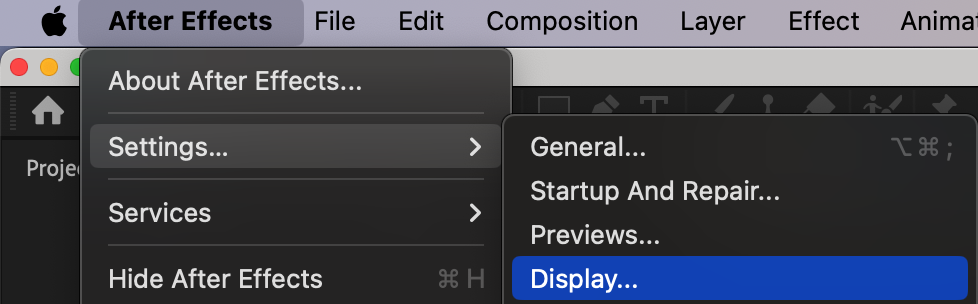
macOS: Go to the After Effects menu, select Settings, and then choose Display.
Step 3: Enable GPU Acceleration for Compositions and Panels
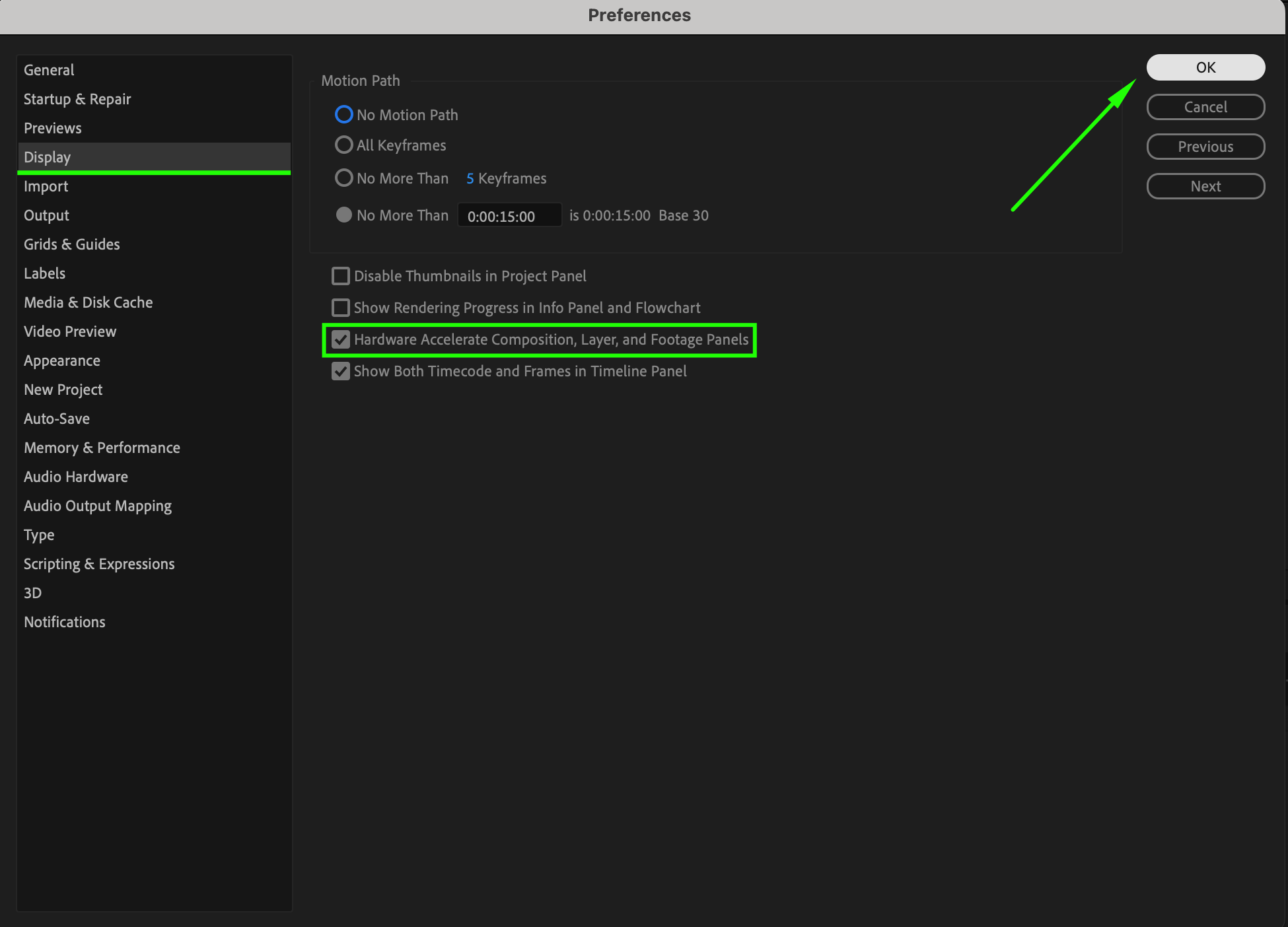
In the Display preferences panel, locate the option “Hardware Accelerate Compositions, Layer, and Footage Panels”. Check the box next to this option to activate GPU acceleration for these components. This setting enhances the performance of the composition and layer panels, improving the responsiveness and efficiency of your editing workflow.
Step 4: Enable Hardware Accelerated Decoding (Requires Restart)
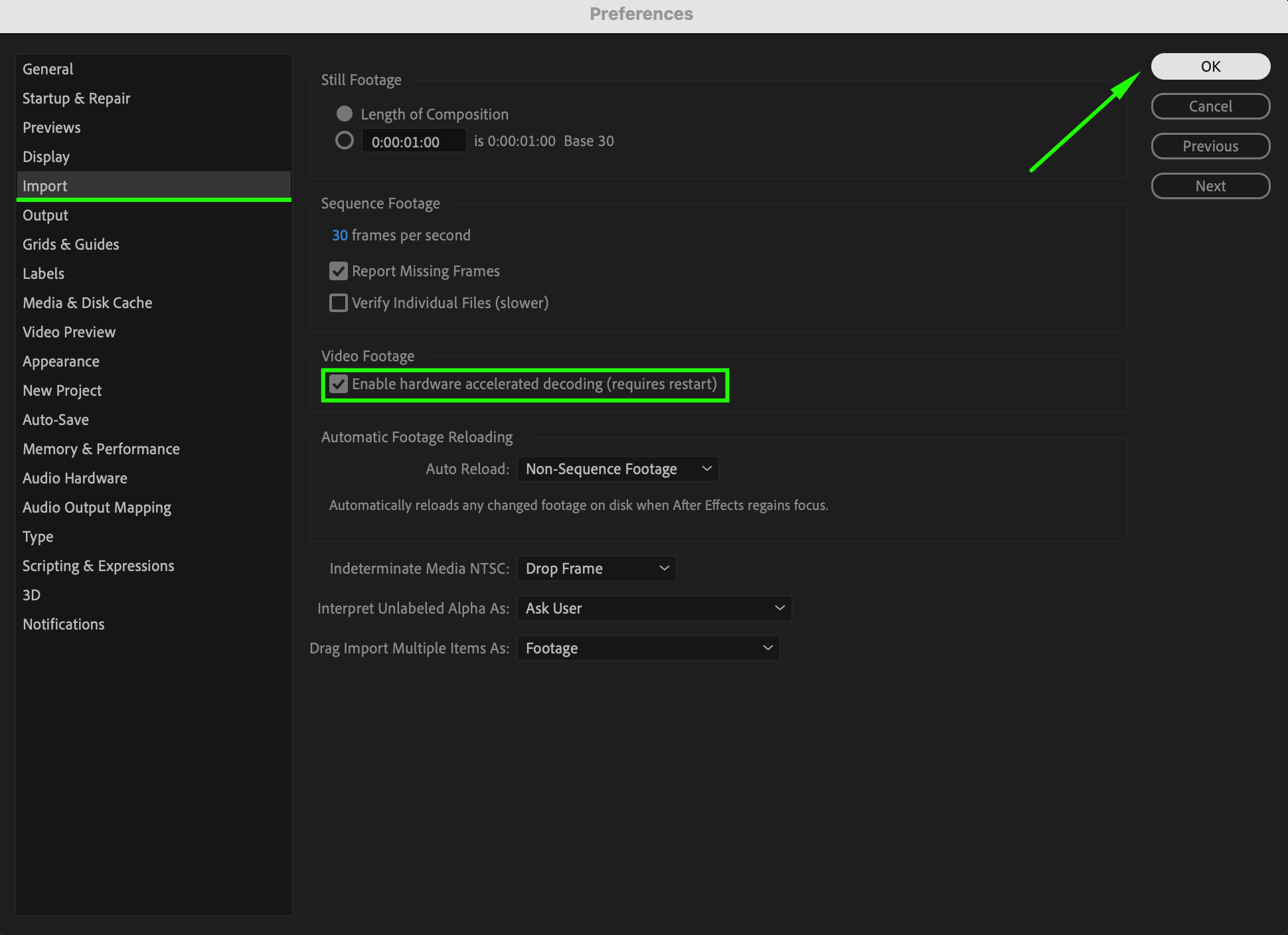
Next, go to the Import Preferences panel:
Find and enable the option “Enable Hardware Accelerated Decoding”. This setting allows your GPU to handle video decoding tasks, which can speed up playback and rendering.
Restart After Effects to ensure this change takes effect.
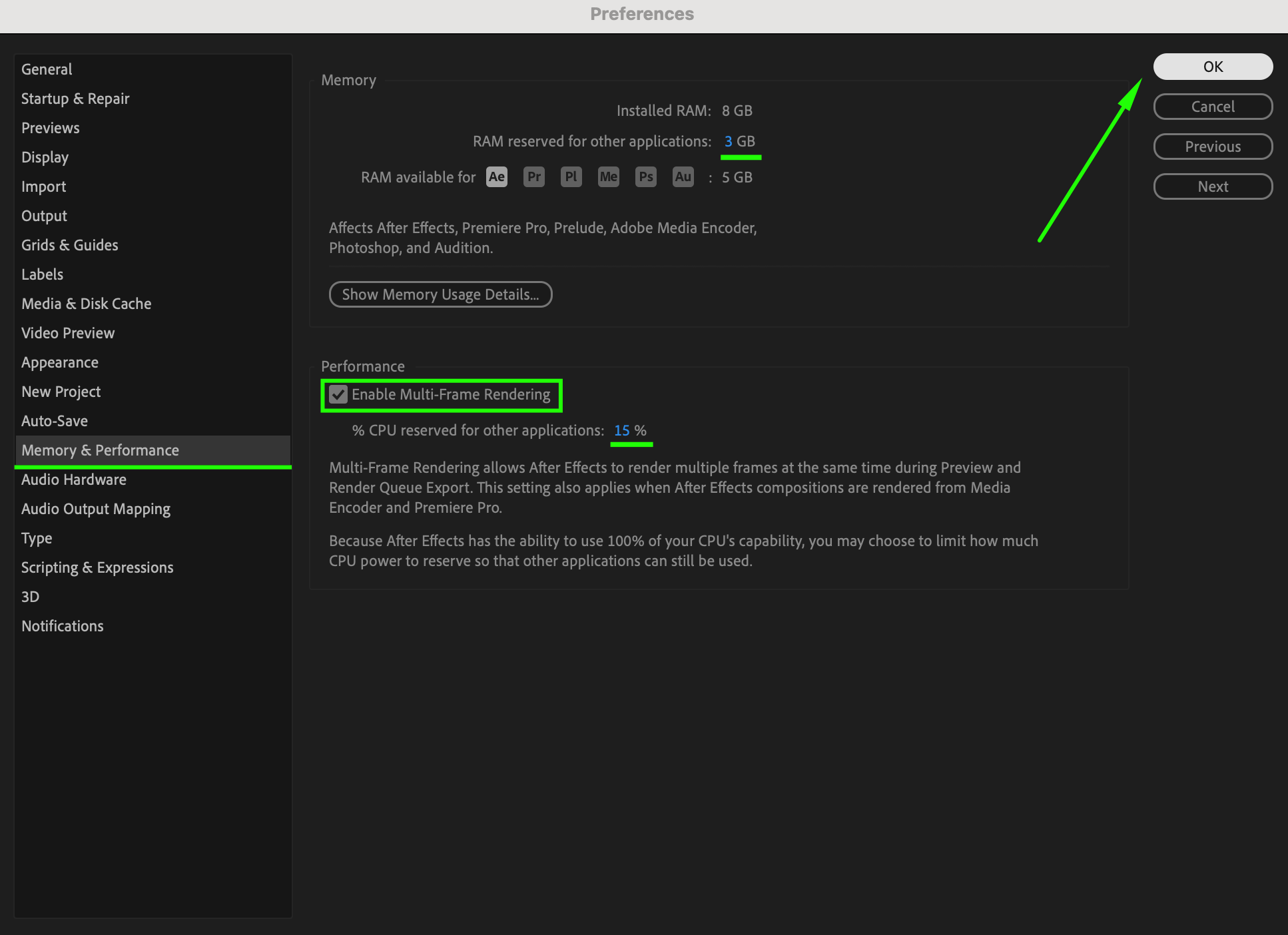
Step 5: Adjust Memory and Performance Settings
Navigate to the Memory & Performance preferences panel:
Enable “Multi-Frame Rendering” to enhance the rendering of complex compositions by using multiple CPU cores.
Adjust the percentage of CPU reserved for other applications and the amount of RAM allocated for other applications. This helps balance system resources between After Effects and other programs.
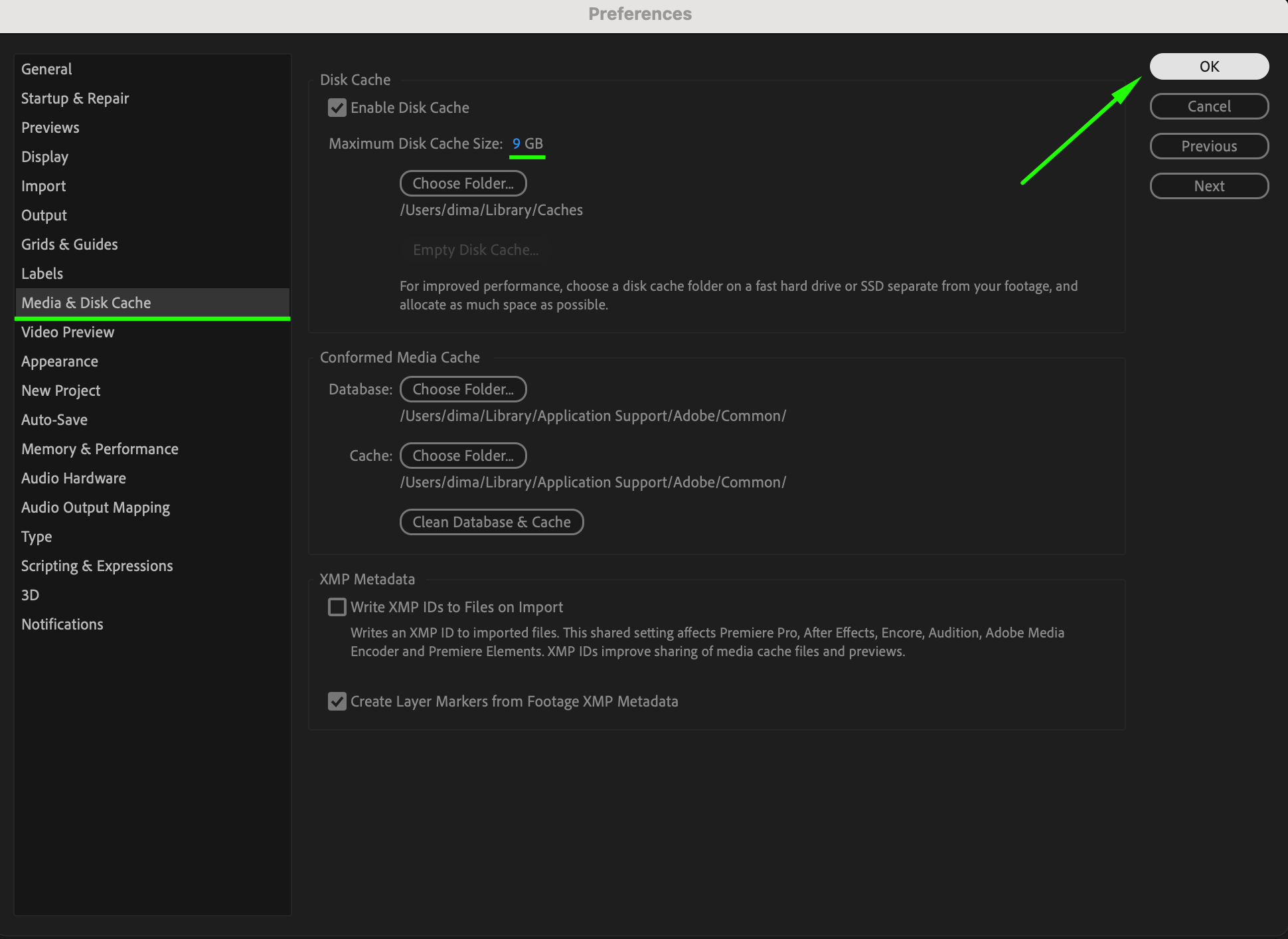
Step 6: Configure Disk Cache Settings
Open the Media & Disk Cache preferences panel:
Set the Maximum Disk Cache Size to an appropriate value based on your available storage. Increasing this size can improve performance by allowing After Effects to cache more data.
Step 7: Save and Restart After Effects
Save your preferences after making these adjustments. Restart After Effects to apply the changes effectively.
Step 8: Test and Enjoy Improved Performance
Once After Effects is reopened, test the display acceleration features:
Load a complex composition and observe the improved rendering and playback speeds.
You should notice faster performance and more responsive real-time previews, which facilitate smoother editing and quicker decision-making.
Additional Tips for Optimizing Performance
Regularly update your graphics drivers to ensure compatibility and performance improvements.
Close unnecessary background applications to free up system resources.
Manage your project’s assets efficiently to prevent slowdowns caused by large file sizes or excessive layers.
Use proxies or pre-rendered footage for complex compositions to reduce GPU strain.
Consider upgrading your GPU if you consistently work on demanding projects requiring high processing power.
Conclusion
By following these steps and tips, you can significantly enhance your video editing experience in After Effects. Enabling display acceleration and optimizing GPU settings will lead to faster rendering, smoother playback, and better real-time previews.
Boost your productivity and bring your creative visions to life with improved performance in After Effects. Experience the difference that proper display acceleration can make in your editing workflow!
Our Bestsellers
Our Bestsellers


