Free Plugins
Products
All Access
Resources
HomeBlogReverse layers like a PRO

Reverse layers like a PRO

TipsJacob Syrytsia
30 Apr, 2025
Save with an AEJuice promo code
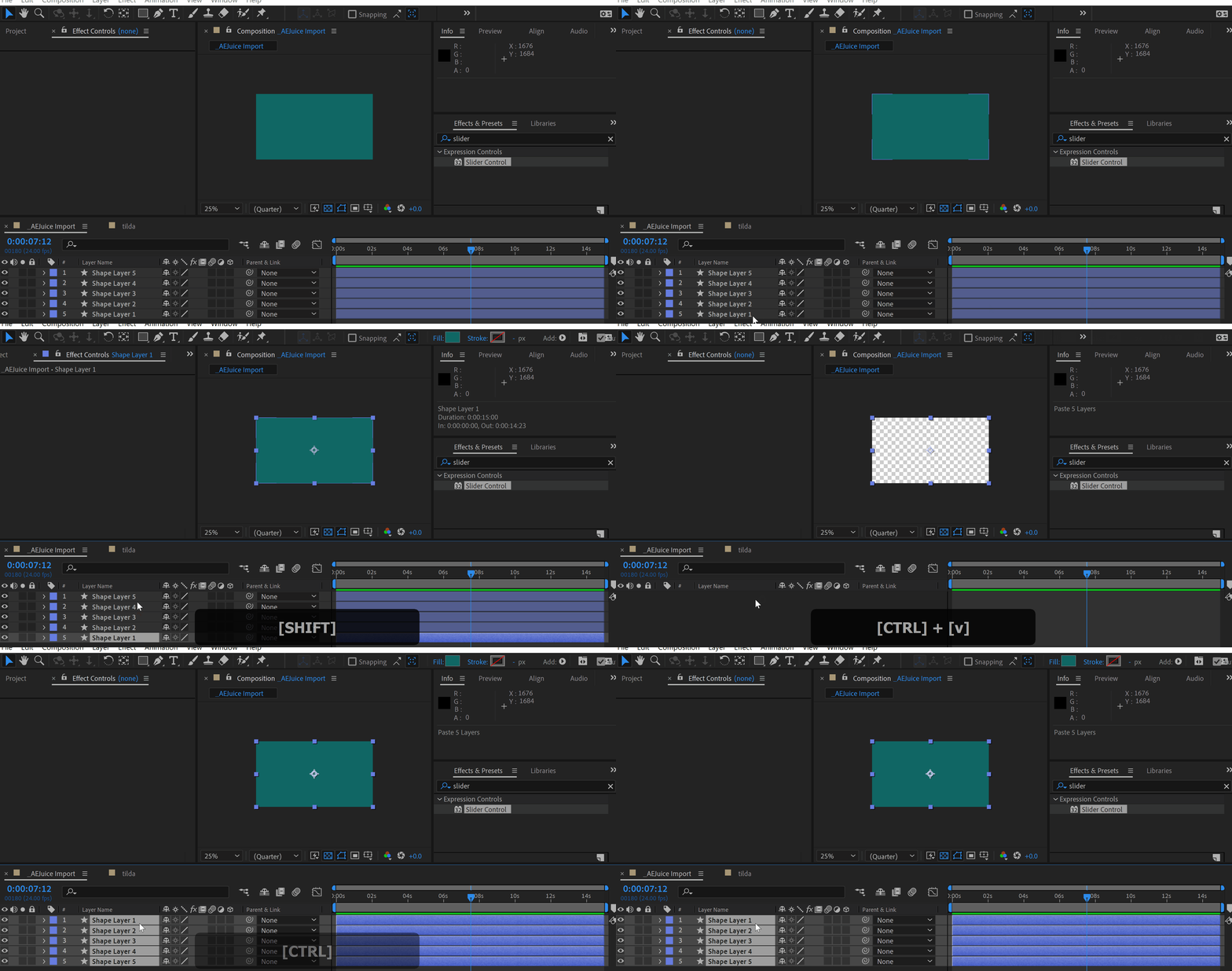
In order to reverse layers in After Effects do the following:
1. Select layers from the bottom up.
2. Cut layers (Ctrl+X).
3. Paste layers (Ctrl+V).

Click here to receive more tips by email.
-50%
-50%
00hrs : 00mins : 00sec
Happy HolidaysSale sitewide
Shop now

Our Bestsellers

Jacob Syrytsia
Similar Articles
thumbnail-fallback.16c3af4eHow to Make an Object Fade in After Effects
Tutorials506487After Effects
thumbnail-fallback.16c3af4eHow to Make an Object Fade in After Effects
Tutorials506487After Effects
thumbnail-fallback.16c3af4eHow to Make Animation in Adobe After Effects
Tutorials506487After Effects
thumbnail-fallback.16c3af4eHow to Make Animation in Adobe After Effects
Tutorials506487After Effects
thumbnail-fallback.16c3af4eMoving Layers in After Effects: Essential Tips and Techniques
Tutorials506487After Effects
thumbnail-fallback.16c3af4eMoving Layers in After Effects: Essential Tips and Techniques
Tutorials506487After Effects
3526675
Email usAnswer within 24 hoursHelp centerDetailed documentation
Quick Links
HomeAffiliatesPrivacy PolicyTerms of UseRefundsContact
Support
ProductsFree PluginsWhat's new?BlogAboutStart Selling
Get 10% Off – Straight to Your Inbox!
By subscribing you agree to your email being stored and used to receive the emails in accordance to our Privacy Policy
Copyright © 2021 - 2026 AEJuice LLC. All rights reserved.
support@aejuice.com